IN999 login
Sign in with the mobile number or email you registered, and your password. This page does not ask for a chat code or a payment PIN. The app uses the same account.

Log in
Use the same +91 number or email you used at registration. If the password fails, do not type OTP into any chat app.
What “IN999 login” should feel like
The real screen is yellow on top, grey form below. Tabs: Phone Number, Email. Placeholder text is plain English. There is Remember password, and Forgot password sits on the right — it does not jump you to a payment page.
A mobile number here is 10 digits and starts with 6, 7, 8 or 9. A leading 0 or a landline is rejected.
When login fails
- Wrong tab: you registered on email, but you are typing the mobile. Switch the tab.
- Old password after you changed it on another phone. Caps lock on cheap Androids is a classic.
- A clone URL in your history. Clear it. Type in999-official.com again.
- Slow 2G. The form submits; the session never sticks. Move to mobile data and retry once.
Still locked out? Do not reset the password on a “mirror site”. Write from customer care with the registered number only.
Login safety that actually matters in India
OTP is not a login method here
Password logs you in. SMS codes, if the app ever sends them, stay on your notification shade. Anyone asking you to forward that SMS is not IN999 staff.
UPI PIN is never a “verification”
Deposits happen after you are inside the account. A page that asks PhonePe PIN before the lobby loads is a harvest form.
Customer care hours
10:00–22:00 India time, seven days. A stranger in chat who says they work all night is not this site.
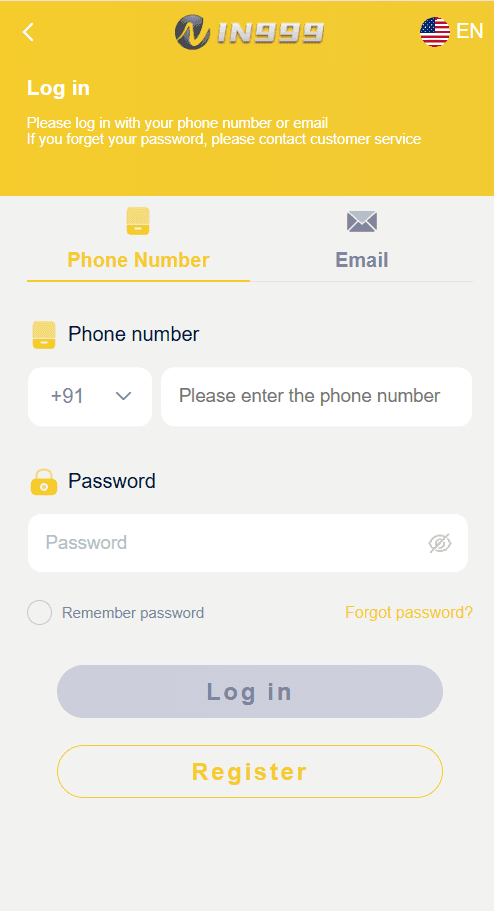
Reference: the live IN999 login UI. Match this layout, not a purple “crypto wallet” clone.
Login questions
Is IN999 login free?
Yes. You do not pay to press Log in. Anyone charging a “gateway fee” before the password field is not this site.
Can I stay logged in?
Tick Remember password on a phone only you use. On a shared café PC, leave it off and log out from Account when you finish.
Does IN999 login work on Android and iPhone?
Yes. The same mobile number or email opens on Android, iOS and this website. Do not install a file sent from a chat app or a shared drive.
Why does the login button look grey on the screenshot?
On the live app the primary button fills once the fields are valid. Colour aside, the official desk is still this domain — not a lookalike.